Architecture
How the driver is built: three layers, one of them yours, and what happens in each when you show something.
Datasheet sections this page relies on
- Supply voltages, current and the three power states: NKK Switches ISF15ACP4_FramelessOLED (sheets E4 to E9, no number printed) none printed, Recommended operating conditions (sheets E5, E7), p. 2
- Serial interface framing, D/C# and chip select: Solomon Systech (copy from the Adafruit mirror) SSD1331 1.2, 7.1.3 Serial Interface, p. 17
- GDDRAM and colour depth: Solomon Systech (copy from the Adafruit mirror) SSD1331 1.2, 7.5 Graphic Display Data RAM; Table 9, p. 20
- Power on and off sequence: Solomon Systech (copy from the Adafruit mirror) SSD1331 1.2, 7.9 Power ON and OFF Sequence, p. 27
- Command table and parameter counts: Solomon Systech (copy from the Adafruit mirror) SSD1331 1.2, 8 Command Table, Table 10, p. 28
All of them, with the driver API for each: Datasheet map.
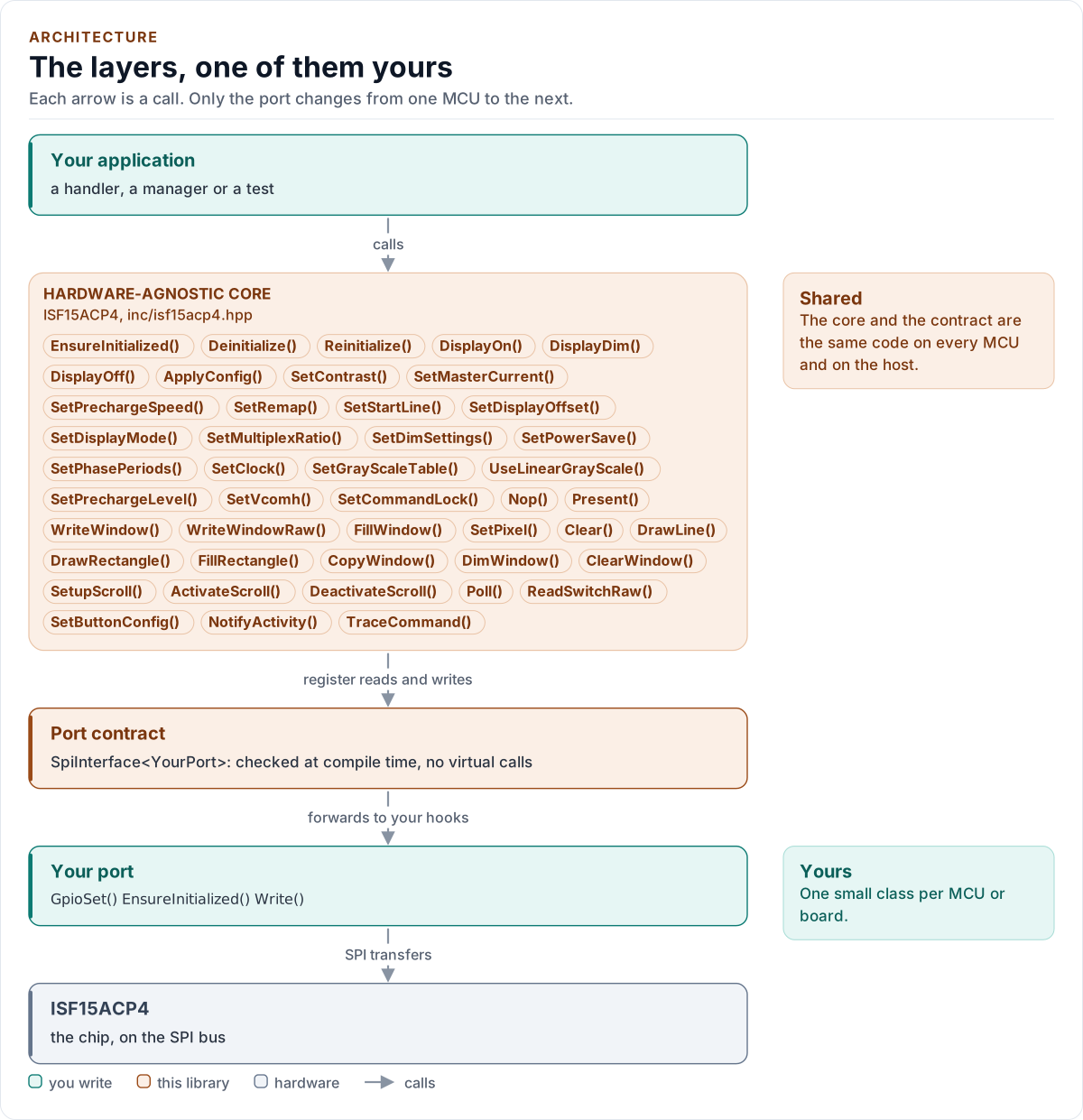
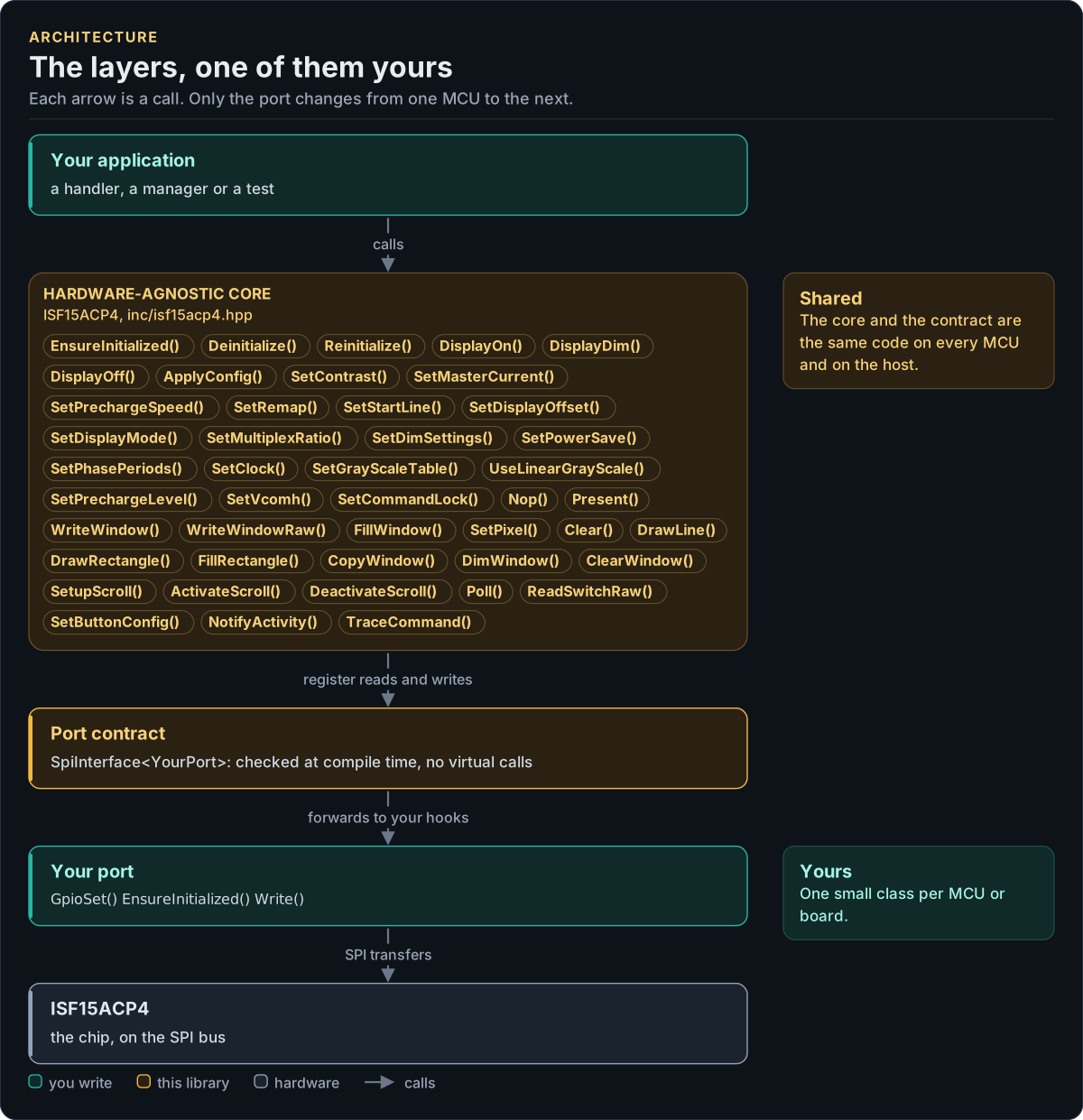
Figure description and sources
Top to bottom, each arrow is a call. Your application calls one object, whose public calls are listed from the umbrella header in inc/. The core turns each call into register reads and writes and hands them to the port contract (the CRTP base in inc/*_interface.hpp), which forwards them, at compile time, to the hooks of the port class you write; your port moves the bytes on the bus. The notes on the right say which layers stay the same on every MCU and which one you write. A library without a port contract has only the first two layers.
Drawn from: inc/isf15acp4.hpp public calls; inc/isf15acp4_spi_interface.hpp SpiInterface; figure module docs/diagrams/figures/driver-layers.py.
Layers
| Layer | Files | Owns |
|---|---|---|
| Core | inc/isf15acp4.hpp, src/isf15acp4.ipp |
The power sequence, configuration, pixel windows, the drawing engine, scrolling, the switch, errors |
| Chip definitions | inc/isf15acp4_registers.hpp, inc/isf15acp4_types.hpp, inc/isf15acp4_button.hpp, inc/isf15acp4_detail.hpp |
The command table and its constants, Config, Error, colours, the debouncer, compile-time helpers |
| Port contract | inc/isf15acp4_spi_interface.hpp |
The bus requirements, CtrlPin, DataKind, the SpiPort concept |
| Platform port | Your class | Bus and pin bring-up, one write-only transfer, two control pins, a delay, optionally the switch pin, a clock, logging |
The debouncer is a separate class with no port and no clock: ButtonDebouncer::Update(down, now_ms) is a pure state
machine, tested alone, and Poll() feeds it from the port.
Show something
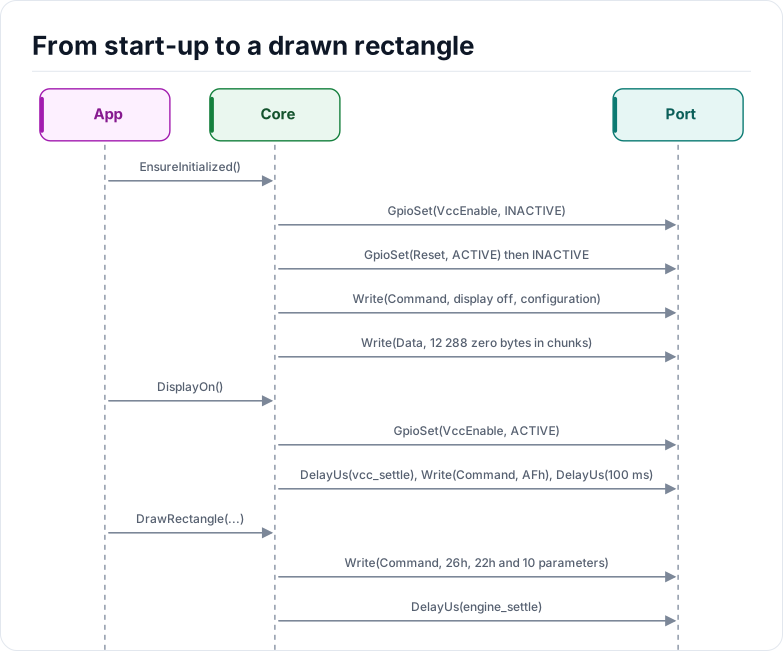
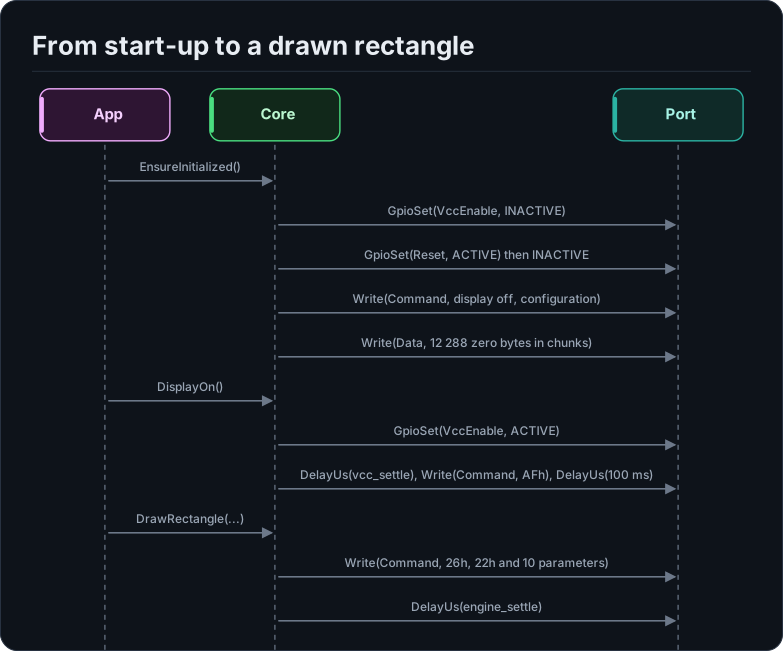
Figure description and sources
Participants, left to right: App, Core and Port. The steps run from top to bottom. App sends EnsureInitialized() to Core. Core sends GpioSet(VccEnable, INACTIVE) to Port. Core sends GpioSet(Reset, ACTIVE) then INACTIVE to Port. Core sends Write(Command, display off, configuration) to Port. Core sends Write(Data, 12 288 zero bytes in chunks) to Port. App sends DisplayOn() to Core. Core sends GpioSet(VccEnable, ACTIVE) to Port. Core sends DelayUs(vcc_settle), Write(Command, AFh), DelayUs(100 ms) to Port. App sends DrawRectangle(...) to Core. Core sends Write(Command, 26h, 22h and 10 parameters) to Port. Core sends DelayUs(engine_settle) to Port.
Drawn from: docs/model/start-up-and-draw.seq.yml.
Every method is one or a few transfers. The core keeps command and pixel buffers as members (command_, data_), so
no call allocates and a Write() always gets a pointer that stays valid until it returns.
The controller model in the tests
The tests do not use a register map of the controller. They use a model that behaves like the controller on the pins:
it decodes commands from its own copy of Table 10, keeps the display RAM, runs the drawing engine and the scroll
state, tracks RES#, VCC, CS# and D/C#, keeps a virtual clock that DelayUs() advances, and records a violation when a
rule of the datasheet is broken. Testing and CI describes it.
Optional hooks
ReadSwitch(), NowMs() and Log() are found at compile time with named concepts in isf15acp4::detail; a hook
declared with the wrong signature is a static_assert that names it, so a typo is never a silently missing hook. A port
without them still gets the full display driver; Poll() returns Unsupported.
Design decisions
- No canvas, no font. The driver stops at the controller: pixel windows, the controller's own engine and
scrolling. A frame buffer would cost 12 kB of RAM that most users of a one-button display do not want to spend,
and a font is a data and licence decision for the application. The colour type and
WriteWindow()are what a graphics layer needs; see Limitations. - A shadow, not a state machine of the chip. Because nothing can be read back, the driver keeps only what it needs to refuse unsafe sequences (initialised, supply on, locked, scrolling). It does not predict what the chip shows.
- Three colour depths, one API.
Coloris always RGB565; the driver encodes each pixel for the depth in the configuration, including the segment order that follows from the panel wiring.